
Unidata - To provide the data services, tools, and cyberinfrastructure leadership that advance Earth system science, enhance educational opportunities, and broaden participation. Unidata
         
  advanced  
 
Table of contents Previous: Graphics and the Cursor - Changing the Cursor Shape, Color, and Size Next: Graphics and the Cursor - Zooming with the Cursor

6.6 Graphics and the Cursor - Contouring Data with the Cursor

In this exercise, you will contour the temperatures and brightness levels of an image.

  1. Erase the graphics in frame 1. Display the latest GOES-7 4km IR image on frame 1 centered on 36° N and 104° W. Magnify the resolution by a factor of 4.

    Type: ERASE G 1;IMGDISP GI4 1 LATLON=36 104 MAG=4 SF=YES

  2. Position the cursor in the center of the frame. Contour the brightness levels using a contour interval of 10 inside a 401 by 401 pixel cursor.

    Type: PC C;IMGPROBE CONT BOX BRIT SIZE=401 401 CINT=10 MODE=N
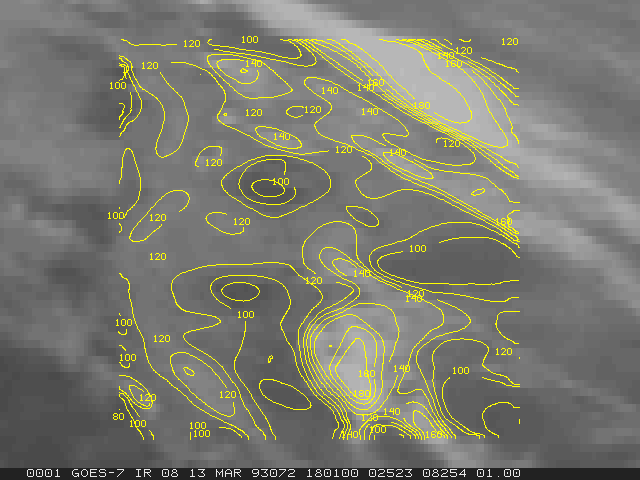
  3. Display the latest GOES-7 4km IR image on frame 2 centered on 36° N and 104° W. Magnify the resolution by a factor of 4.

    Type: IMGDISP GI4 2 LATLON=36 104 MAG=4 SF=Y

  4. Position the cursor in the center of the frame. Contour the temperature inside a 401 by 401 pixel cursor. Specify a contour interval of 5 Kelvin.

    Type: PC C;IMGPROBE CONT BOX TEMP SIZE=401 401 CINT=5 MODE=N


Table of contents Previous: Graphics and the Cursor - Changing the Cursor Shape, Color, and Size Next: Graphics and the Cursor - Zooming with the Cursor


  Contact Us     Site Map     Search     Terms and Conditions     Privacy Policy     Participation Policy
 
National Science Foundation (NSF) UCAR Office of Programs University Corporation for Atmospheric Research (UCAR)   Unidata is a member of the UCAR Office of Programs, is managed by the University Corporation for Atmospheric Research, and is sponsored by the National Science Foundation.
P.O. Box 3000     Boulder, CO 80307-3000 USA     Tel: 303-497-8643     Fax: 303-497-8690