


Level II data is accessed in the IDV from the remote THREDDS Data Server, each file having data from one WSR-88D radar for all sweeps (tilt) for one time.
Read more about Receiving and Storing Level II Data
Edit→Remove All Displays and Data menu item
or the  icon in the toolbar to clear them out.
 Projections→Auto-set Projection option is checked on. View→Show→Wireframe Box. Data Choosers. 
Data Choosers click on the
Radar node in the chooser tree. Then click on the NEXRAD Remote tab to see the
Level II radar data remote chooser panel. http://thredds.ucar.edu/thredds/radarServer/catalog.xml
Level II Radar for Case Study CCS039
Absolute time radio button.
Select the images from 1998-06-29 21:00:00Z
through 1998-06-29 21:59:00Z.Add Source button. 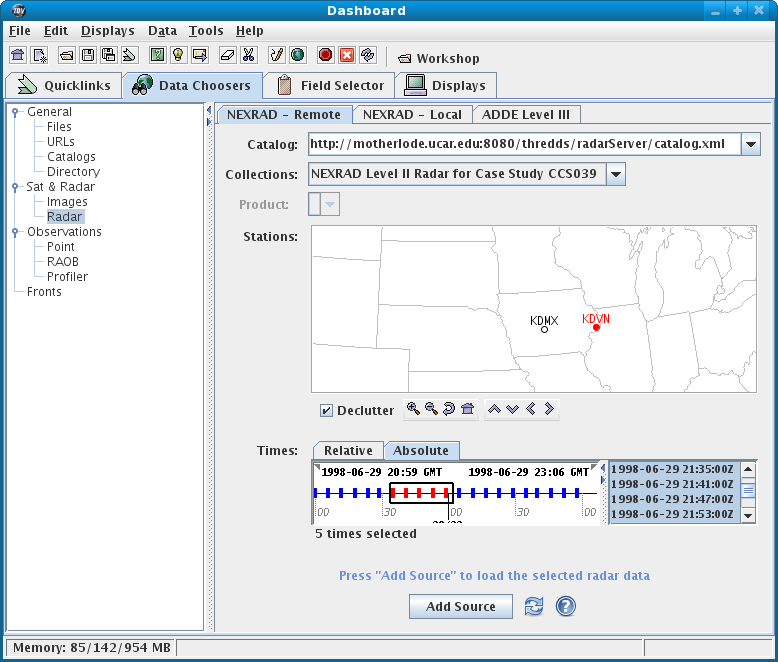
Level II Radar (KDVN)
appears in the Data Sources list in the
Field Selector.
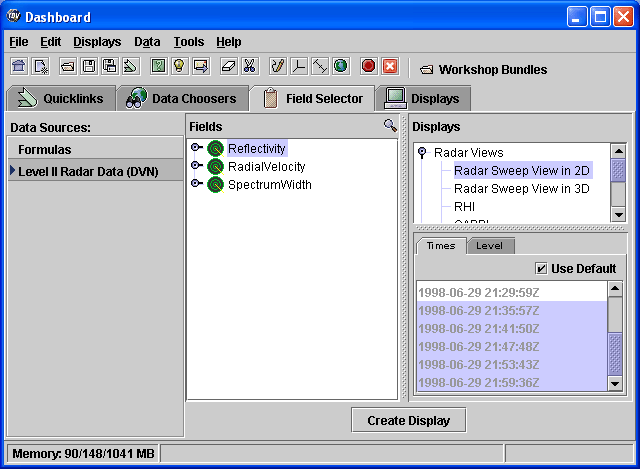
Let's look at some of the properties of this dataset.
Data Source Properties editor for Level II Radar Data(DVN).
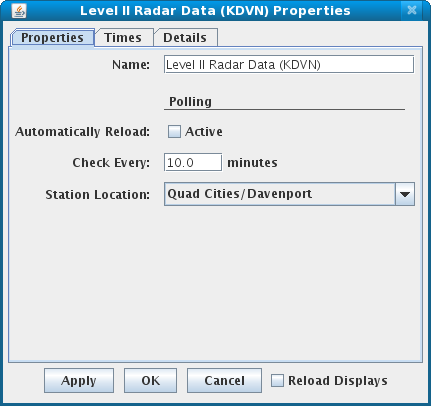
OK. Fields (radar data moments or
data types). The IDV has several display types for Level II data. Any
of the moments can be shown with any of the displays. For the following
exercises, we will use Reflectivity.